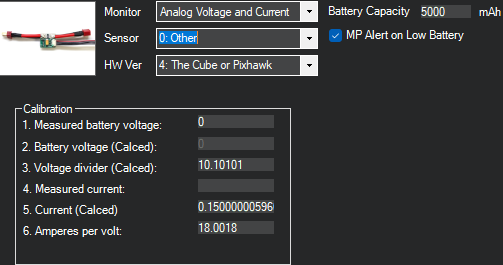
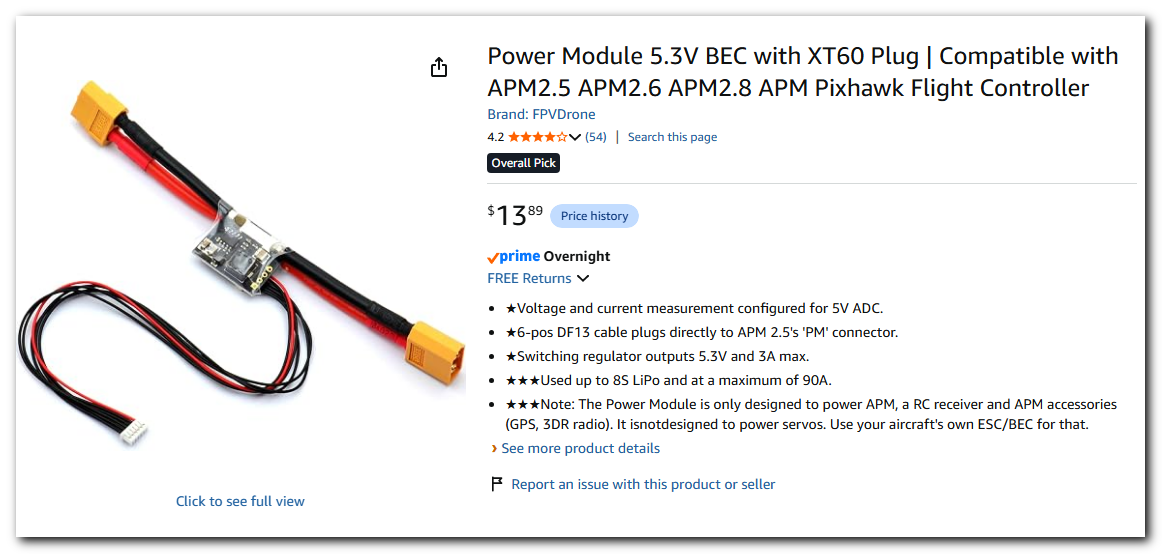
I have completed building the Pixhawk drone, but I have an issue with the Hud in Mission Planner showing the battery at 0 volts. I’m using the battery monitor that came with the kit. I tried setting the Battery Monitor in Setup to the recommended settings as in the photo:
But when I refresh this screen, the Sensor entry always changes to “3DR Power Module”. I’ve looked through the Parameters, but I can’t find an entry for this.
I’ve also tried changing the “Measured battery voltage” to the current the current voltage and even got another battery voltage module.
I would appreciate any and all suggestions.
This is from an AI response. It might help but it looks like you were on that track anyway.
That dropdown in Mission Planner is just a friendly label mapped to specific parameter values (mainly BATT_VOLT_PIN/BATT_CURR_PIN/BATT_VOLT_MULT/BATT_AMP_PERVLT). If those params don’t exactly match a known preset, Mission Planner falls back to displaying “3DR Power Module” (its generic default) even though you picked something else — this doesn’t mean your changes didn’t save.
Most likely cause of 0V
0V almost always means the flight controller isn’t seeing any analog signal on the pin it’s expecting. Check these in order:
Physical connection — Confirm the power module is plugged into the Pixhawk’s dedicated POWER port (not just powering the ESCs/rail). If it’s only supplying power but not signal, you’ll get 0V readings even while the drone flies fine.
Confirm the actual parameter values saved — Go to Config/Tuning → Full Parameter List, search “BATT” and check:
BATT_MONITOR — should be 4 (Analog Voltage and Current) for most kit power modules, not 0 (disabled).
BATT_VOLT_PIN and BATT_CURR_PIN — must match your specific board. Some Pixhawk clones default to pin 2 (voltage)/pin 3 (current), but this varies by board.
BATT_VOLT_MULT — if this is 0 or blank, voltage will read as 0 even with a good signal.
Click “Write Params” (not just navigate away) — On some Mission Planner versions, the Battery Monitor tab doesn’t reliably auto-save; you have to explicitly write params after selecting values.
Try “Other” instead of a named preset — If your kit’s power module isn’t a genuine 3DR one, select 0: Other and manually enter the voltage/amp multipliers instead of relying on the dropdown presets, then write params and refresh.
Calibrate against a multimeter — Once you get any nonzero reading, compare it to a multimeter reading on the battery and adjust BATT_VOLT_MULT proportionally (new_mult = old_mult × actual_voltage / MP_displayed_voltage).
Battery parameters all show as listed in message. I still cannot get the Batt_Sensor to keep the Other setting, and I don’t see anywhere in the Full Parameter list to change it. I know it did initially have and keep the Other setting.
I did not see a “Write Params” options on the Battery Monitor screen in Setup.
I do not know what power module it has, it only says “POWER MODULE GM v1.0” on it. I acquired another battery module that looks exactly like the original, but it still has the same issue.
A. Reflash the firmware. If the latest version doesn’t work, try an older version.
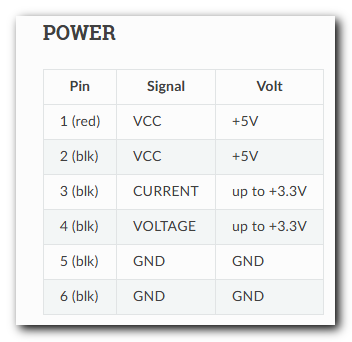
B. Test if the board voltage sense pin is dirty or faulty. You can power the board via the RPi, then apply a small voltage (<3v) to the sense pin and watch the HUD or ‘Measured battery voltage’. You can use a bench supply, or a 3v coin battery or AA. Be sure to connect the board ground. Avoid a higher voltage that might ruin the board. Make sure to check the board pinout diagram so you are touching the correct pins.
Here is a reference to the power pinout, so it looks like it is pin 4.